
Unstable Tippy Cargo Guide
More interactive relics will be released at Tiki Oasis in San Diego in August 2026.
Quick Start - No Batteries
Place the side of the crate OPPOSITE the one that says Tikibar.tech face down on your relic amplifier (the Tiki Head or the Stone Alter). If you don't immediately see the light blink, as it should when a relic is recognized, move the crate around a bit until it does.
This will create a random explosion on the Enchanted Portal. Since there are a variety of explosions and some are dependent on the time of day, the random explosion chosen may not be compatible with the current time of day. So if nothing happens simply pick up the crate and place it back down. Eventually it will pick a random explosion compatible with the current time of day on the Enchanted Portal and something will happen.
Powering on the Crate
Insert 4 AA batteries into the bottom and replace the battery cover. Slide the switch to the ON position. The TNT should blink blue a few times and then turn solid blue. This indicates the crate is searching for the Enchanted Portal.
In either case the crate is now ready to be tipped.
IMPORTANT: This little crate has a lot going on and requires all the power it can get. Fresh batteries are essential for optimal performance. When the batteries begin to deplete you may notice that the crate works for a few minutes and then becomes slow to react or stops reacting. Also the vibration will become significantly less. When this happens you can, of course, just turn the crate off and back on to reset it and continue to use it for a few minutes and this may be perfect for you. However it's probably time to replace the batteries when it starts misbehaving. Using rechargeable batteries might work but be aware they tend to deplete faster and over time, even at full charge, don't always supply optimal power. If you plan to use rechargeable batteries you will just have to experiment and see how long they last.
How to Hold the Crate for Tipping
Hold the crate with the side that says TIKIBAR.TECH to the RIGHT and TNT right side up and facing you. There's really only one way you can make that happen so hopefully you can figure it out. This is the starting position of every tip sequence, so if you make a mistake just return it to this position and hold it still for a few seconds until you see the TNT blink purple and blue and then go dark as that is the RESET indication.
Tips on Tipping the Crate
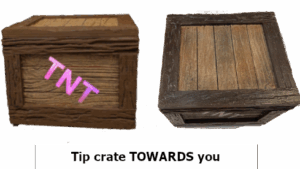
Each recognized TIP of the crate will result in TNT blinking green once. When tipping LEFT or RIGHT a full rotation will result in four blinks, one for each 1/4 rotation. When tipping the crate FORWARD (towards you) or BACKWARD (away from you) a full rotation will result in only two blinks, one for each 1/2 rotation. LEFT, RIGHT, FORWARD and BACKWARD remain the same regardless of the position the crate is currently in. E.G. if during a sequence the crate ends up upside down then right is still to the right, backward is still away from you, etc. Don't overthink it.
During tip sequences it will also help to keep the crate aligned such that the side facing you is flat and straight rather than at an odd angle. Think of each tip as ending with the crate sitting on a flat table top.
LEFT and RIGHT rotation is relatively forgiving with regards to the speed at which you tip. Don't try to tip with lightning speed, or snail slow, just somewhere in between. Practice tipping RIGHT until you see it blink green, then stop and tip it back to the upright position (it should blink green again). Try this for different speeds watching to make sure you always see the green blink.
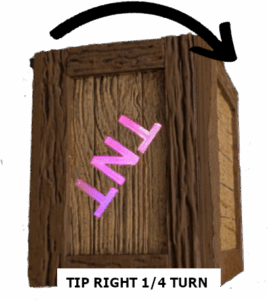
FORWARD and BACKWARD rotation requires a faster tip for more consistent results. Additionally you should only see two green blinks for a full rotation, one for the first half until upside down, and one from upside down back to right side up. Try tipping the crate away from you slowly until upside down. If you saw two green blinks then you are tipping it too slowly so tip it back to upright position and then try again faster. Forward and backward definitely require a more speedy flip of the position.
A Successful Tip Sequence
When a successful tip sequence is completed the crate will blink green several times in rapid succession. The crate will then react in some predefined manner which may involve flashing, vibrating, blinking different colors or many other things. Additionally if the Enchanted Portal is available it might trigger an effect such as an explosion, time of day change, or even making the volcano erupt.
The crate will automatically reset a few seconds after it completes it's reaction.
Resetting the Crate for a new Tip Sequence
Resetting the crate rotation sequence simply requires returning the crate to the starting position and holding it there until you see the lights blink purple (as in the above image) and then blue and then go off. The crate is now ready to begin a tip sequence.
DON'T GET YOUR CRATE WET! If you need to clean it for any reason use a soft, damp cloth.
In either case the crate will blink Purple and Blue to indicate it is the next players turn.
NOTE that shaking the crate harder or faster has no effect on the probability the it will explode. In fact shaking it harder will likely make it so it takes longer to heat up and get ready to explode.
If you have the Mystic Aurora LEDs they will also pulse rainbow at the start of each game. Additionally they will explode when the crate explodes as previously mentioned.
The Sequence to enter Game Mode is as follows:
- From the starting position (Tikibar.tech on the left) tip the crate away from you 1/5 turn. As mentioned in the Usage section, a quick flip works best for forwards (towards) you and backwards (away from you) rotations, while slower tips work better for LEFT and RIGHT rotations.
- Tip the crate towards you, back to the starting position.
- Roll the crate to the RIGHT all the way around (360 degrees) until it is back in the starting position. To give you an idea of speed, a full rotation should take you about 3 or 4 seconds to perfom.
Exiting Game Mode
To exit Game Mode just cycle the power OFF and then back On again.
Tip Sequences
Always start a sequence with the crate in the starting position: TIKIBAR.TECH to the right and TNT right side up and facing you. Wait until you see the crate blink purple and then blue and then you can begin a sequence.
When a tip sequence has been completed successfully the crate will blink green several times and then perform whatever the associated effect might be.
Note that the first time a sequence is encountered in the instructions below some additional words of help are provided to remind you of best practices. Remember these as the next time those helpful words may not be presented.
Explode Barrel in the RiverDifficulty 2
Tip the crate to the RIGHT all the way around 360 degrees. This FULL rotation should take 3 to 5 seconds to give you an idea of speed.
RESULT: During any time of day, if not storming, the barrel in the river will explode.
Explode Barrel in the RocksDifficulty 2
Tip the crate to the LEFT all the way around 360 degrees. This FULL rotation should take 3 to 5 seconds to give you an idea of speed.
RESULT: During any time of day, if not storming, the barrel in the rocks will explode.
Explode the Crate on the IslandDifficulty 3
- Tip the crate to the RIGHT 1/4 turn.
- Tip the crate LEFT back to the starting position.
- Finally roll the crate to the LEFT until it is upside down.
RESULT: During sunset and night the crate on the island will explode. Again, when not storming.
Barrel Falls off Cliff and ExplodesDifficulty 5
- Roll the barrel FORWARD (towards you) until upside down. Remember this type of rotation works better with faster movements, so quickly flip the crate to the upside down position.
- Continue in the same direction until the crate is back to the starting position. Again do it quickly.
- Roll the barrel LEFT all the way around 360 degrees back to the starting position. This should take 4 to 5 seconds.
RESULT: Barrel fall off the cliff by the waterfall on the left and explodes. Sunset and Night only.
Erupt the VolcanoDifficulty 7
- Tip BACKWARD (away from you) until upside down.
- Tip to the RIGHT until right side up.
- Tip LEFT 1/4 turn.
- Tip RIGHT 1/4 turn back to rightside up.
RESULT: Volcano on Enchanted Portal will erupt.
Make the Crate RainDifficulty 8
- Turn the crate FORWARD (towards you) until upside down.
- Turn the crate BACKWARD until right side up.
- Turn the crate BACKWARD until upside down.
- Turn the crate FORWARD until right side up.
Explode Barrel in the RiverDifficulty 7
- Tip LEFT 1/4 turn
- Tip RIGHT 1/4 turn
- Tip RIGHT 1/4 turn
- Tip LEFT 1/4 turn
- Tip LEFT 1/4 turn
- Tip RIGHT 1/4 turn
- Tip BACKWARDS until upside down.
Something RandomDifficulty 3
- Tip RIGHT until upside down
- Tip LEFT 1/4 turn
- Tip RIGHT 1/4 turn
ConfettiDifficulty 3
- Tip LEFT until upside down
- Tip RIGHT 1/4 turn
- Tip LEFT 1/4 turn
- Tip LEFT 1/4 turn
Shake Shake ShakeDifficulty 1
Shake and turn the crate left and right, up and down, turn it upside down and rightside up. Make the TNT blink green 7 or 8 times and it will explode.
Entering Game ModeDifficulty 2
1) Tip BACKWARDS(away from you) 1/4 turn
2) Tip FORWARDS back to the starting position.
3) Tip RIGHT until upside down
4) Tip RIGHT until back to starting, right-side up, position